
A listing has to be activated before it appears in search results on Gig Heaven. If your listing is inactive, this article explains why and how to get it live.
Listing statuses
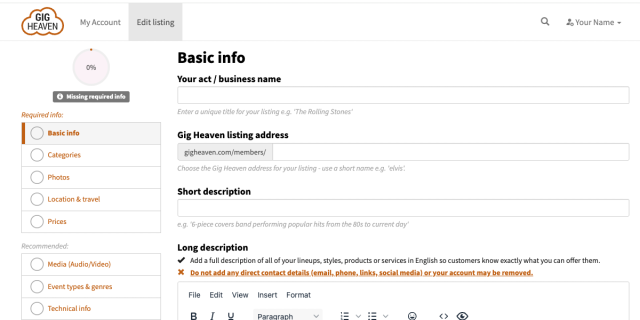
Every listing has a status shown at the top of the listing editor. You'll see one of the following:
- Missing required info. One or more required fields still need completing. The Required info panel on the editor lists what's missing.
- Ready to activate. Everything required is now filled in. You can click Activate Listing to request activation.
- Activation requested. You've clicked activate and we're reviewing the listing. This normally happens quickly (within a working day, often sooner).
- Listing active. Your listing is live and showing in search.
Completing missing info
If your status is Missing required info, open your listing from My Account and look at the Required info panel. It lists exactly which fields still need attention. Typically:
- A unique listing name and Gig Heaven URL.
- At least one category and sub-type.
- Short and long descriptions.
- At least one photo.
- Your location.
- A pricing choice.
Fill these in, and the status will update to Ready to activate.
Requesting activation
When the status is Ready to activate, the Activate Listing button appears in the listing editor and in the navbar of your account. Click it to send your listing to our team for review.
If activation is declined
Very occasionally we ask you to make changes before approval (for example if photos are unclear, descriptions contain contact details, or a required field is effectively empty). If this happens, we'll email you with what needs changing. Make the updates in the listing editor, then request activation again.
If you haven't finished activating in a while
If you signed up a while ago but never completed activation, we may send you a reminder email. That email links straight to your listing so you can pick up where you left off.
After you're live
Once your status is Listing active, you'll appear in search. To attract more enquiries, add more content and take a look at the Improve & promote your listing page. See also Standing out: promoted listings, badges and widgets.
If you have any trouble, please contact us.



