
If an enquiry or message looks suspicious, abusive, or simply not genuine, you can report it to us. This article explains how reporting works, what we do with reports, and what you can do if someone is sending you unwanted messages.
Reporting an event or conversation
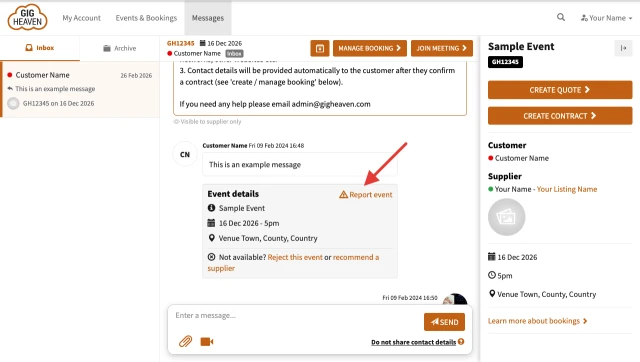
- Open your Messages.
- In the conversation, click Report event (look for the orange warning-sign icon).
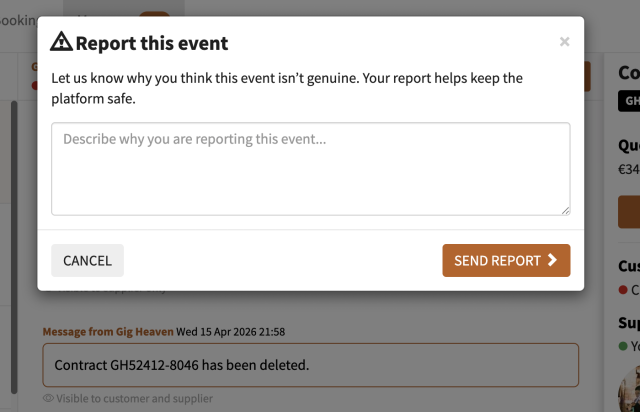
- A short form opens asking Why do you think this event isn't genuine? Describe what looks off: spam, scam pattern, abusive language, fake details, anything else.
- Click Send report.
What to report
Anything that doesn't feel right. Common patterns:
- Off-platform payment requests. If someone is trying to get you to pay outside Gig Heaven.
- Suspicious event details. Implausible budgets or dates, generic messages, obvious copy-paste.
- Requests for personal details before a contract is in place.
- Abusive or harassing language.
- Impersonation or phishing. For example, a supplier asking you to sign in on an external site, or a customer quoting from a fake email.
For the full guide to recognising bad actors, see Spotting and avoiding scams.
What we do with reports
Every report is read by a real person on our team. Depending on what's reported we might:
- Review the event and messages in full.
- Remove the event or account if it breaches our terms.
- Follow up with you for more detail if needed.
- Ban an IP address or email pattern if a scam looks coordinated.
Reports are treated confidentially. We don't tell the reported party who reported them.
Blocking
There isn't a self-serve block button at the moment (messaging is tied to bookings, and a block would also block the underlying event). If you're getting repeat unwanted messages from the same person, report the event so we can take action on the account level.
If you have any trouble, please contact us.



