
You can join a meeting directly in your Gig Heaven account (like a Zoom-call).
Joining a meeting
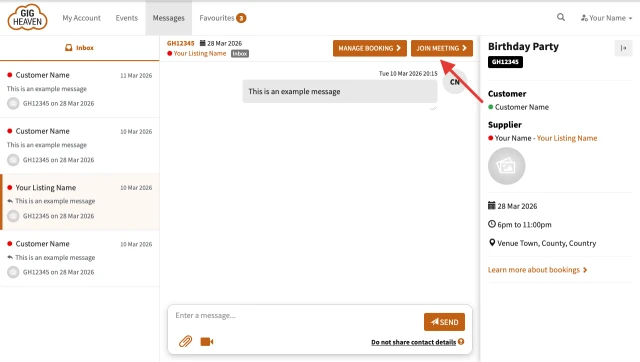
- You will find the 'join meeting' button at the top of your messages page.
About meetings
- Meetings can be attended by up to four people (customer, supplier and 2 guests).
- Meetings are free, but have a time limit of 60 minutes and are subject to our acceptable use policy.
- Any device with a microphone can be used (e.g. phone, tablet, laptop, computer).
- If you want to see each other, you will need a webcam, or a device with a built-in camera.
- All meetings are recorded and transcripts will be created for trust, moderation and safety purposes.
Allow your browser access to your devices
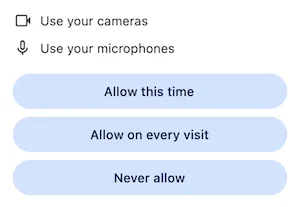
- When you join the meeting your browser will ask you to allow access to your camera and microphone - click "Allow on every visit".
Adjusting your audio/video devices
On a desktop computer:
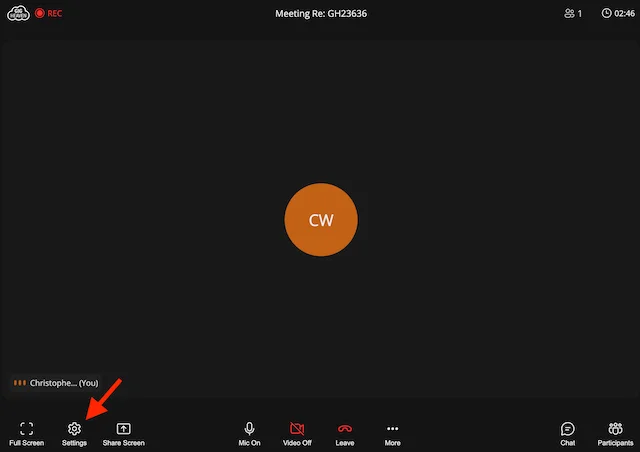
- Click the settings icon to configure your audio/video devices:
On a mobile device:
- Click the 3 dots to open the settings menu and choose settings to configure your audio/video devices:

Technical issues
- Use a modern and up-to-date web browser (e.g. Chrome/Firefox/Safari). If you are having issues, try a different browser or device.
- No sound/video? When you join the meeting make sure you allow your browser access to your microphone and camera when prompted. In the meeting click the settings button to change your audio/video devices and make sure your volume level is turned up on your device.
- Avoid using a VPN for better latency.
- Try to use a good internet connection - use WiFi on mobile whenever possible and reduce any unneeded activity on your network.
- If you need any help, please contact us and we will help you.
Video call terms & conditions
By joining a Gig Heaven Video Call, you agree to abstain from:
- Inappropriate language
- Offensive comments related to gender, sexual orientation, disabilities, physical appearance, race, religion, accent, dialect etc.
- Hate speech / harassment / threats of violence
- Adult, nudity, or sexual activity
- Any attempts to move business off of Gig Heaven
Safety tips
- Don’t share any sensitive personal information
For example: Contact details, passwords, card information, ID card numbers, or any other private information. - Only open links or file attachments you trust
We recommend that you use an antivirus on your device for extra security. - Don't use any remote access tools
Refrain from using tools (e.g. TeamViewer) that allow someone else to potentially take control of your computer. Our video meetings allow screen-sharing so such tools should not be necessary. - Don’t engage in any conversation that makes you feel uncomfortable
Remember, have the option to report your video call by contacting us.



