
You can send photos, videos, audio files, documents, and YouTube or Vimeo video links directly in your messages to a customer or supplier. The paperclip icon attaches files of any supported type, and the camera icon attaches a YouTube or Vimeo video link. This article covers both options, what's allowed, and a few tips on when attachments help.
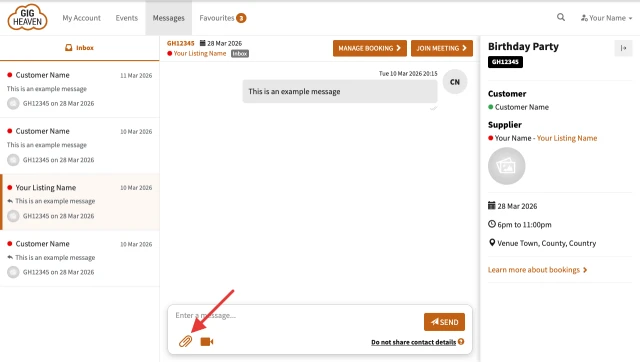
Sending a file attachment (paperclip icon)
The paperclip handles every supported file type - photos, videos, audio, and documents. See the full list under What file types are supported below.
- Open the conversation from My Account.
- In the message box, click the paperclip icon.
- Drop a file into the upload area, or click to browse from your computer.
- Add any covering message text, then send.
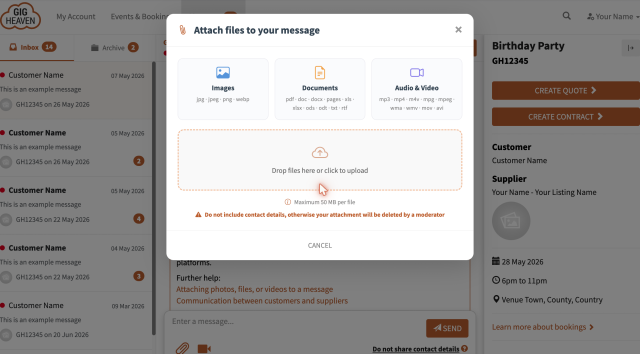
The recipient sees the attachment inline in the conversation and can open or download it from there.
What file types are supported
A wide range of common formats works out of the box (all sent via the paperclip icon):
- Images. JPG / JPEG, PNG, WebP.
- Documents. PDF, DOC / DOCX, Pages, TXT, RTF, ODT, ODS, XLS / XLSX.
- Audio. MP3, MPG / MPEG, WMA.
- Video. MP4, M4V, MOV, AVI, WMV.
Sending a YouTube or Vimeo video (camera icon)
The camera icon sits next to the paperclip in the message composer. Use it to attach a YouTube or Vimeo video link - the recipient can play the video inline in the conversation without leaving Gig Heaven.
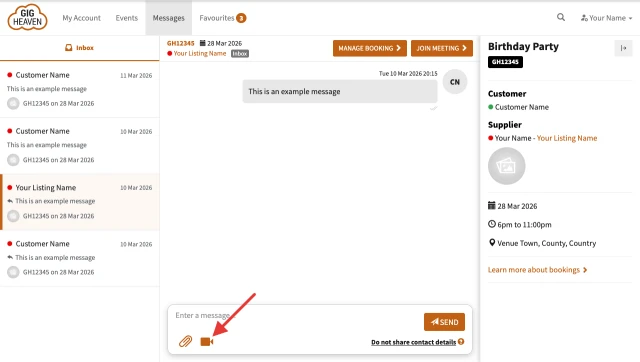
- Open the conversation from My Account.
- Click the camera icon in the message box.
- Paste the YouTube or Vimeo URL and confirm.
- Add any covering message text, then send.
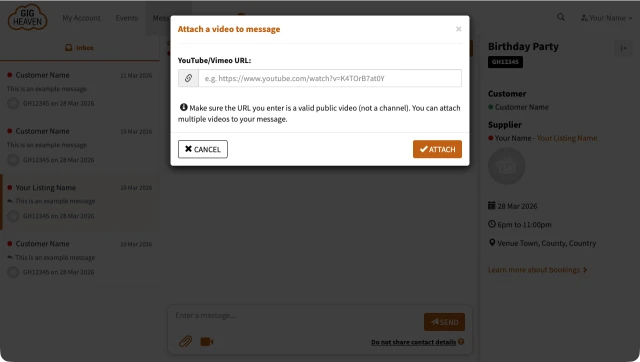
If you want to send a video file rather than a link, use the paperclip icon instead - see supported video formats above.
Moderation
Every attachment goes through an automated moderation check before it's shown to the other side. If an attachment looks like it contains direct contact details or references to external booking platforms, we'll flag the message and ask you to keep communication on Gig Heaven. For the full picture, see Why we ask you to keep communication on Gig Heaven.
When attachments help
- Stage plots and rider info for technical discussions.
- Photos of the venue or setup space so the supplier can plan.
- Quick audio snippets of specific first-dance or ceremony songs.
- Signed paperwork or reference docs (although the contract itself stays on Gig Heaven).
- YouTube or Vimeo demo links so the customer can hear or see your work without downloading.
Removing an attachment
Once a message is sent, its attachment is part of the conversation and can't be unsent. If an attachment contains something you'd rather the other side didn't have (for example, you attached the wrong file), send a quick follow-up message asking them to disregard it, and contact us if you'd like us to remove it on our side.
If you have any trouble, please contact us.



