
Clear pricing helps the right customers enquire and saves you time answering the same pricing question over and over. This article covers the pricing options on your listing, how prices are shown to customers, and practical advice on what to charge.
Where prices are set
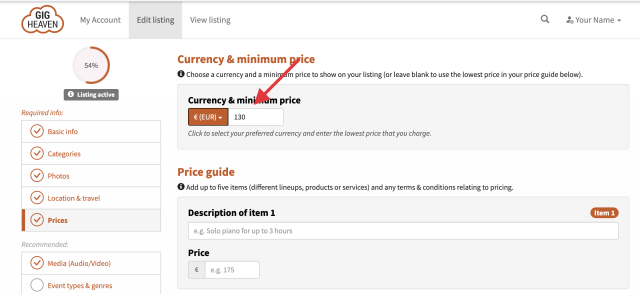
Open your listing from My Account and go to the Prices tab. You can:
- Choose whether to show any prices at all.
- Set a base price.
- Add up to five named price tiers for different options.
- Write a short price terms paragraph.
- Set your currency.
Showing or hiding prices
You can either publish prices or choose not to. Published prices let customers self-qualify (those who can't afford you don't bother enquiring), and attract more enquiries overall because the number is visible. Hidden prices mean every enquiry is a chat, which some suppliers prefer. There's a toggle on the Prices tab.
Tiered prices (up to five)
Most acts offer more than one setup. Tiers let you show that at a glance. For each tier:
- Description (free text), for example Solo piano for up to 3 hours or Jazz trio, two 45-minute sets.
- Price (number).
These render as a clean table on your listing with the description and price side by side.
Price terms
Use the Price terms textbox to cover everything that might shift the number: travel, late finishes, extended sets, equipment hire, deposit, payment method, and so on. Typical example:
Currency
We set your default currency based on your account location, but you can change it on the Prices tab. Customers searching in a different currency see an approximate conversion. See Supported currencies for the full list.
What should I charge?
A few pointers:
- Check what similar acts charge. Search Gig Heaven for your category and area.
- Price for the whole package. Don't forget travel, equipment, time away from family, and the value of your experience.
- Give yourself options. One tier fits one type of customer. Three or four tiers widen your market.
- Leave room for premium dates. NYE, Christmas, and bank holidays typically command more.
Keeping prices up to date
We send customers a year of enquiries. Keep prices accurate so an enquiry from February next year still matches what you'd charge. Revisit your Prices tab at least once a year.
If you have any trouble, please contact us.



