
Bookings on Gig Heaven are confirmed with a small deposit paid through the site. The remaining balance is paid directly to the supplier according to the terms on your contract. This article covers the full flow.
Why a deposit?
The 10% deposit is Gig Heaven's booking fee, paid to us rather than to the supplier. It does two things:
- It commits you to the booking, so the supplier can safely turn down other enquiries for that date.
- It lets us confirm the event and automatically share direct contact details between customer and supplier so you can coordinate the day.
The remaining 90% balance is a separate payment made directly from you to the supplier, as set out in your contract. Gig Heaven never handles the balance.
Until the deposit is paid, the contract is agreed but not confirmed, and contact details stay hidden. See Understanding contract statuses for the full sequence.
Paying the deposit
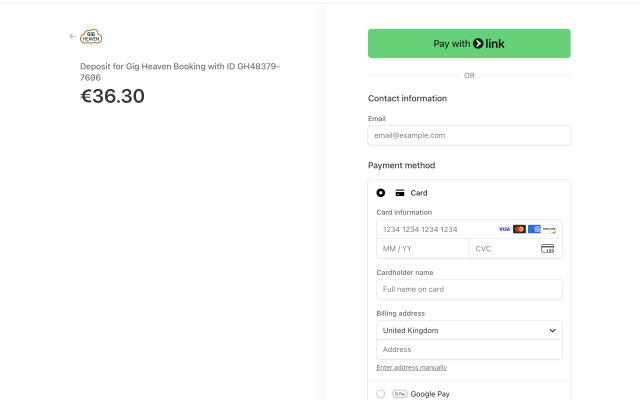
Once you've agreed a contract, a Pay deposit option appears on the booking. Click it to open a secure checkout powered by Stripe.
- Enter your card details on the Stripe checkout page.
- Submit the payment. Your card is verified and, if it passes, the deposit is taken immediately.
- You're returned to Gig Heaven and the booking moves to Contract fully confirmed (deposit paid).
For the detailed walkthrough (including screenshots of the Stripe page), see How to pay the deposit for your booking. If the card is rejected, see Failed card payments / payment issues and Alternative payment methods if you can't pay by card.
Paying the remaining balance
The remaining balance is paid directly to the supplier, not through Gig Heaven. The method and timing are set out in the contract's Fee and Payment section, in the supplier's own payment instructions. Typical arrangements are:
- Bank transfer a few days before the event.
- Cash on the day of the event.
- A mix (for example, a second payment on the day and the rest by bank transfer).
Check what the contract says, and if anything isn't clear, message the supplier (or have a video meeting) to confirm before the event.
Receipts and invoices
You can download a receipt for your deposit from your booking. See How to view your payment receipt / invoice. For a VAT-compliant invoice (UK businesses paying in GBP), see VAT, invoices, and paying as a business.
Currencies
Deposits can be charged in a range of currencies. The full list is in Supported currencies.
If you have any trouble, please contact us.



