If an enquiry or message looks suspicious, abusive, or simply not genuine, you can report it to us. This article explains how reporting works, what we do with reports, and what you can do if someone is sending you unwanted messages.
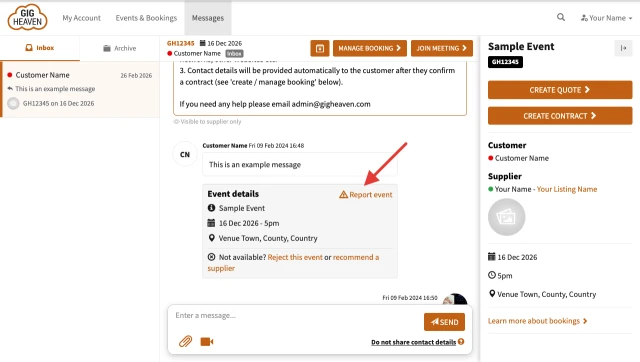
In the conversation, click Report event (look for the orange warning-sign icon).
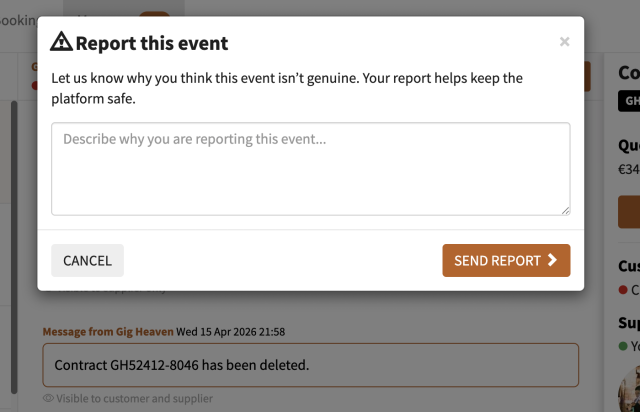
A short form opens asking Why do you think this event isn't genuine? Describe what looks off: spam, scam pattern, abusive language, fake details, anything else.
Click Send report.
A quick report takes 30 seconds and helps us keep the platform clean. You'll see a Thanks! Your report has been received. confirmation once it's in.
The Report event link sits in the top-right of the Event details panel below the conversation messages.The Report this event modal that opens after clicking the Report event link.
What to report
Anything that doesn't feel right. Common patterns:
Off-platform payment requests. If someone is trying to get you to pay outside Gig Heaven.
Every report is read by a real person on our team. Depending on what's reported we might:
Review the event and messages in full.
Remove the event or account if it breaches our terms.
Follow up with you for more detail if needed.
Ban an IP address or email pattern if a scam looks coordinated.
Reports are treated confidentially. We don't tell the reported party who reported them.
Blocking
There isn't a self-serve block button at the moment (messaging is tied to bookings, and a block would also block the underlying event). If you're getting repeat unwanted messages from the same person, report the event so we can take action on the account level.