
Honest reviews are the single biggest influence on which suppliers customers pick. This article covers how customers leave a review, how suppliers can respond, and how reviews are moderated.
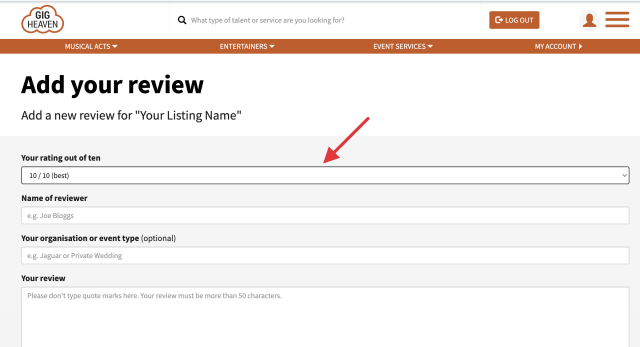
After an event, the supplier can invite you to leave a review. You'll receive an email titled Feedback Request (For event GH...) with a link. Click the link to open the review form.
On the form you'll enter:
Click submit. You'll see a confirmation, and the review is sent for moderation.
Every review is checked before going live. This stops spam and helps us catch anything that needs clarifying. Reviews for brand new listings are normally approved within 24 hours after the listing itself has been activated. Established suppliers usually see reviews appear within the same or next working day.
You can add a reply to any review on your listing. Replies appear below the original review as Reply by [your listing name].
Tips for a good reply:
If you made a mistake in a review (for example a typo or wrong detail), contact us and we'll edit it for you. Reviews are generally kept as left to preserve integrity, but we do remove reviews that break our acceptable-use policy (for example abusive language or false information).
If you're about to submit a rating below our typical threshold, the form asks you to confirm you meant it. This is a sanity-check, not a barrier, genuine low ratings can go through and help future customers make an informed choice.
If you have any trouble, please contact us.
Gig Heaven has members, our newest member is (updated )



