
Help & Support / Understanding contract statuses

Understanding contract statuses

Every booking on Gig Heaven moves through a sequence of contract statuses. Knowing what each one means tells you what's expected of you next, and when the event counts as confirmed.
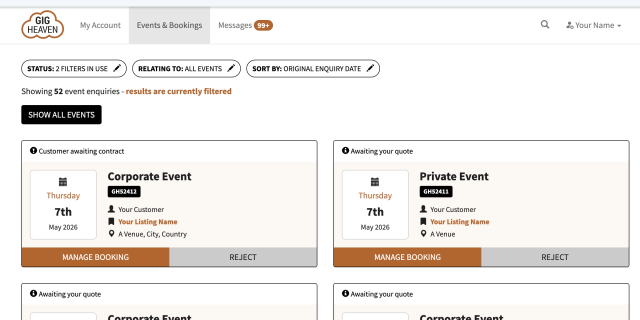
Events list with contract status badges per event
The Events list, with the current contract status shown above each event.

The full list of statuses

In the order they usually happen:

  • Contract created (not yet sent). The supplier has drafted the contract but hasn't sent it to the customer yet.
  • Contract sent (awaiting customer signature). The contract is waiting for the customer to review and agree. See Creating a booking contract for what goes in a contract.
  • Contract amendments requested. The customer has asked for edits before signing. The supplier updates the contract and re-sends.
  • Contract agreed (awaiting customer deposit). The customer has signed. They now pay the deposit to confirm the booking. See How to pay the deposit for your booking.
  • Contract fully confirmed (deposit paid). Deposit received. The event is locked in, and direct contact details are now shared between customer and supplier so they can coordinate the day.
  • Event completed. The event date has passed. Suppliers at this stage can ask the customer for a review, see Requesting a review from your customer.
  • Contract expired. The contract wasn't agreed by its due date. See Expired contracts for how to revive one.
The contract status is shown at the top of the booking in your My Account events list. If something's unclear, the status tells you whose move it is next.

Which transitions are automatic

  • Customer signs the contract, status moves to Contract agreed (awaiting customer deposit).
  • Deposit payment lands, status moves to Contract fully confirmed and we share direct contact details between both sides.
  • Event date passes, status moves to Event completed automatically overnight, and the supplier gets an email asking if they want us to invite the customer to leave a review.
  • The contract's valid-until date passes without agreement, status moves to Contract expired.

Which transitions need action

  • Sending the contract in the first place, the supplier does this from the booking.
  • Agreeing or requesting amendments, the customer does this from the contract page (using the Agree to contract or Request edits buttons).
  • Paying the deposit, the customer does this from the booking after agreeing the contract.

Common questions

  • How do I know if the deposit's been paid? The status changes to Contract fully confirmed (deposit paid), and contact details become visible to both parties.
  • What if the event date changes? See How to change the date of an event.
  • What if we want to cancel? See Cancelling a booking.

View your bookings

If you have any trouble, please contact us.

Related articles

Can't find what you're looking for?

We're here to help
Contact us

