Sometimes a contract needs a few edits before the customer is ready to sign. This article explains how the customer requests changes, what the supplier does next, and how it affects the deposit.
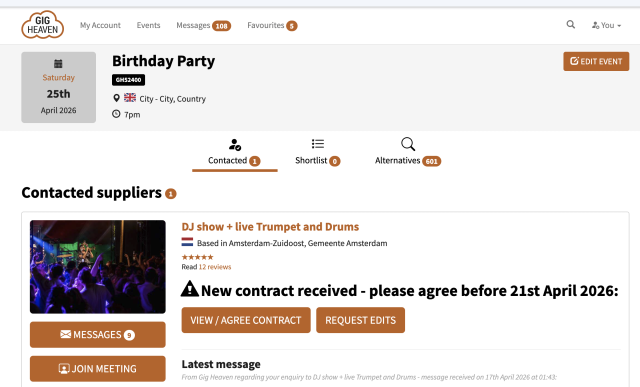
The customer event view with the "New contract received" alert and the AGREE CONTRACT and REQUEST EDITS buttons.
Requesting changes (customer)
When a supplier sends you a contract, you'll see two options on the contract page:
Agree to contract, if everything is fine.
Request edits, if you want changes first.
Click Request edits. A form opens asking What would you like to change? Describe the edits clearly (timings, fee, services, travel, anything else) and click Send.
Be specific. "Please move the start time from 7 to 8 pm and add an extra 30 minutes to the set" is much faster to action than "some timings need changing".
What happens next
Once you send the amendment request:
The contract status changes to Contract amendments requested.
The supplier sees your notes in the booking messages and updates the contract.
The supplier re-sends the contract, status goes back to Contract sent (awaiting customer signature).
You review the updated contract and click Agree to contract if it's right.
Can I keep requesting edits?
Yes. If the supplier updates the contract and there's still something to change, click Request edits again. That said, big back-and-forth is usually faster settled in a quick message or a video meeting. Use amendment requests for the specific contract text you want changed.
Impact on the deposit
If you haven't paid the deposit yet, amendments are zero-impact. You only pay once the final contract is signed.
If the deposit has already been paid and a small change is needed (timings, small service tweaks), no payment action is needed, the deposit stays with the booking.
For bigger changes after the deposit is paid (a new date the supplier can't cover, a venue change that alters the fee significantly), talk to the supplier first. If anything on the payment side needs sorting, contact us and we'll help.
If the deadline is near
Every contract has a valid-until date. If you let it pass without agreeing (or requesting edits), the contract expires automatically. If you need more time, either:
Request edits to keep things moving, even if it's a minor change.