
A passkey lets you sign in to Gig Heaven without typing a password. It uses your device (fingerprint, Face ID, Windows Hello, or a PIN) to confirm it's you. Passkeys are faster than passwords and much harder to phish or steal.
Straight after you sign in with your email and password, we show a prompt:
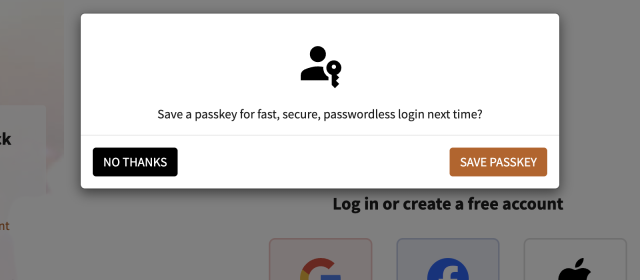
Click Save Passkey, then follow your device's prompts to save the passkey. Your device chooses how to verify you (Touch ID, Face ID, Windows Hello, a security key, or a PIN).
If you picked No thanks at the time but now want to save one, you can add a passkey any time from the passkey management page.
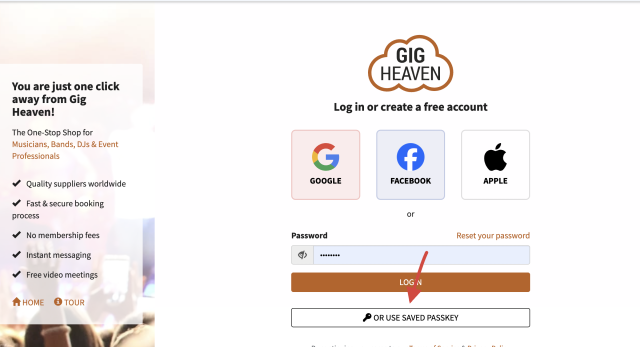
That's it, no password to remember, no code to type.
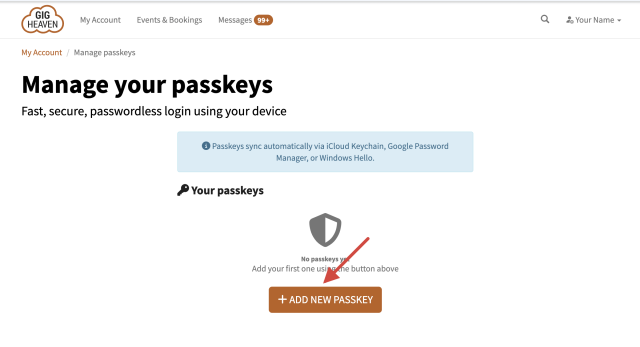
You can add more passkeys, rename them, or delete them from the Manage passkeys page in My Account.
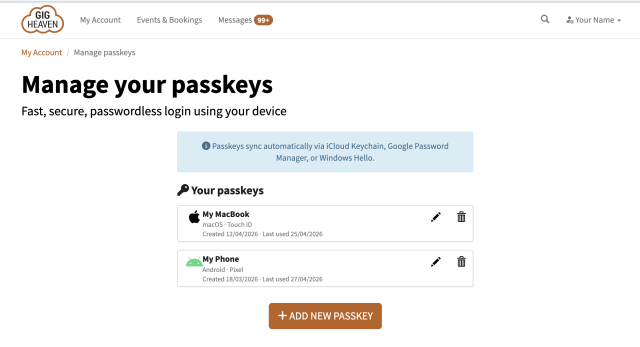
Most modern phones, tablets, and computers sync passkeys through Apple iCloud Keychain, Google Password Manager, or a third-party password manager. That means a passkey saved on your iPhone can often sign you in on your Mac automatically, and vice versa. If your device or password manager doesn't sync, just save a passkey on each device you use.
If your device is broken or lost, or you've deleted the passkey by mistake, sign in using your email address and password instead. See Logging in: email, passkeys, and social sign-in for the other sign-in options. If you don't have a password set, use Reset your password to create one.
If you have any trouble, please contact us.
Gig Heaven has members, our newest member is (updated )



